Classic Softech Product

Classic Retail POS Software

Windows desktop point-of-sale software for retail billing, barcode entry, product pricing, inventory workflows and configured GST calculations.

Choose a setup that fits your store: one PC, multiple billing computers connected over a LAN, offline branches with data synchronization, or Online POS 1.2.

Barcode billing Inventory workflows Billing & tax fields
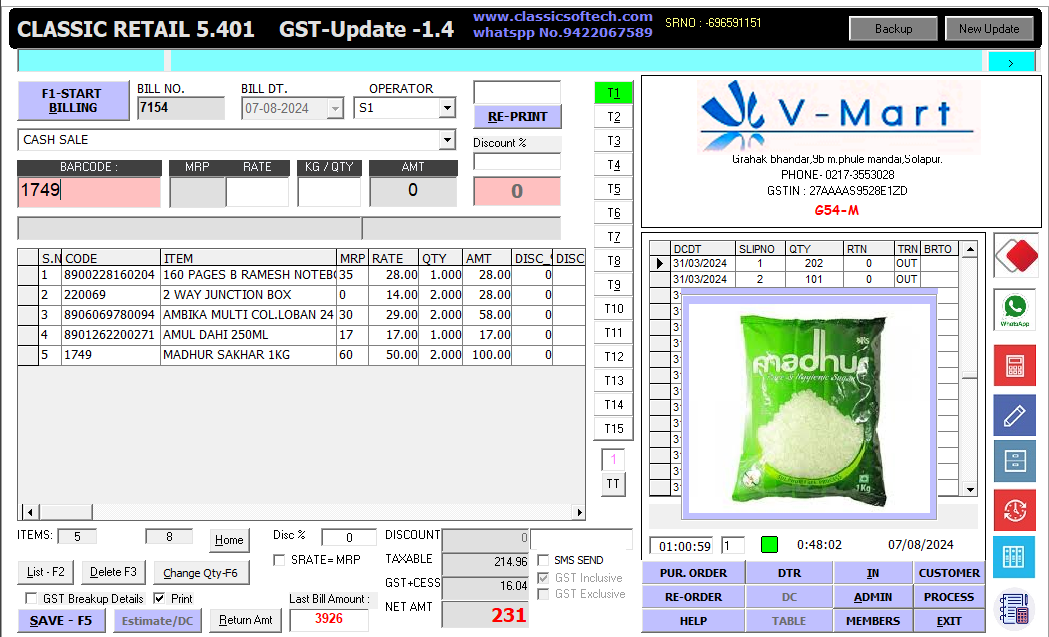
Authentic Classic Retail 5.401 Windows desktop POS billing screen showing barcode entry, item grid, pricing, quantity and bill totals
Actual Classic Retail billing screen supplied by Classic Softech.
ABOUT THE SOFTWARE

Retail billing and store operations in one workflow

Classic Retail 5.401 is a Windows desktop POS application. The supplied billing screen shows fields for bill number, bill date, operator, barcode, item code, product description, MRP, rate, quantity, amount, discount and bill totals. The visible tax area includes taxable value and GST-related amounts.

Retailers can use the application according to the features and configuration of their installed version. The most suitable deployment depends on how many computers and branches need to work with the store's data.

FLEXIBLE DEPLOYMENT

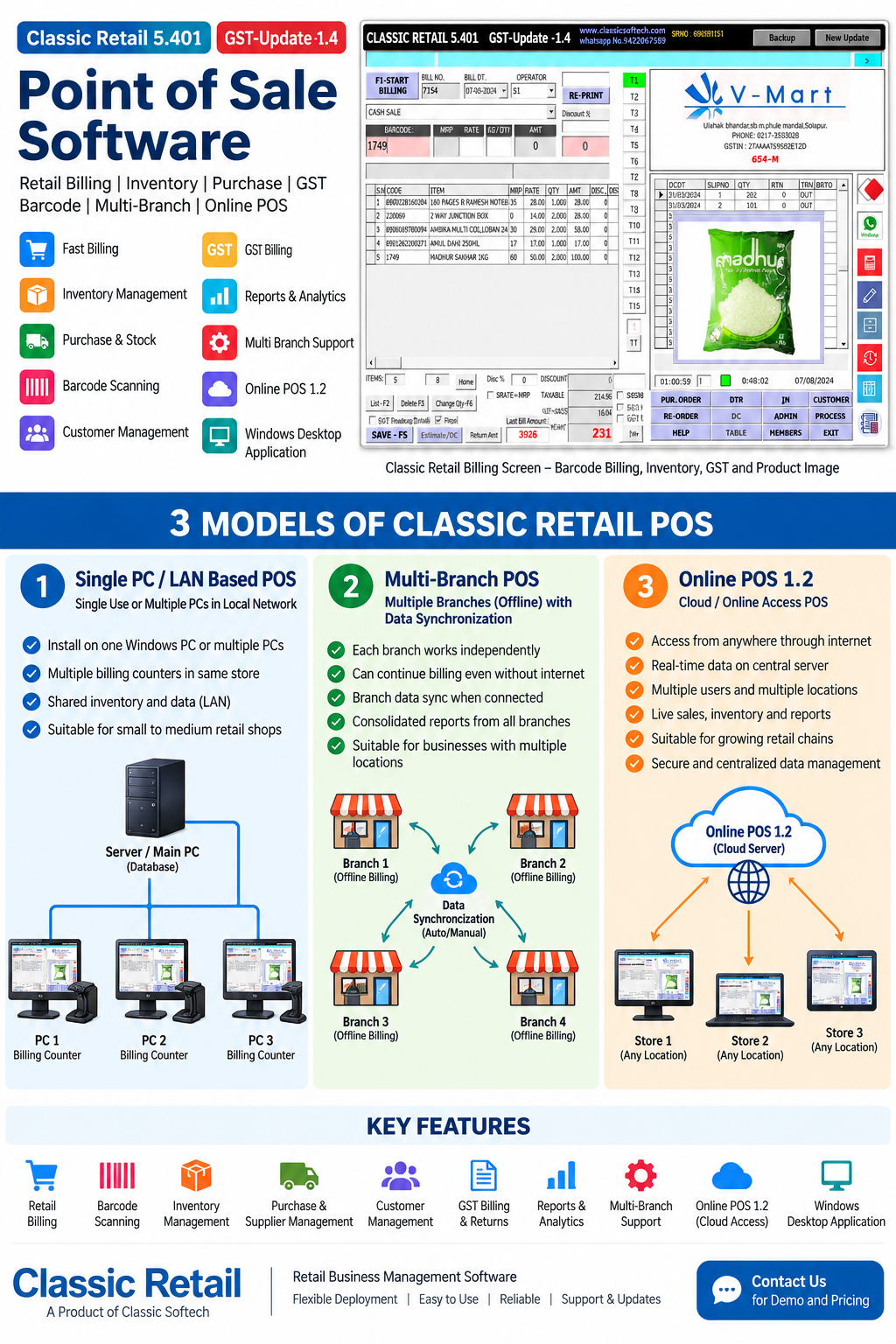
3 Classic Retail POS Models

Select the deployment approach that matches your retail operation. Confirm supported functions and setup requirements with Classic Softech.

1

Single PC / LAN POS

For one store using one computer or multiple PCs on a local network.

  • Single-PC, single-user setup.
  • Multiple billing computers on a LAN, where configured.
  • Barcode and item-based billing workflow.
  • Shared store data in a supported LAN configuration.

Suitable for stores that need one billing station or several local counters.
2

Offline Multi-Branch POS

For businesses whose branches need to operate independently and synchronize data.

  • Each configured branch works with its local installation.
  • Local billing can continue during internet interruptions, if supported by the setup.
  • Branch data synchronization when connectivity is available.
  • Branch information can be coordinated through the configured sync process.

Ask us how synchronization, conflict handling and consolidated reporting work in your version.

3

Online POS 1.2

For businesses using the online POS deployment.

  • Online access according to the Online POS 1.2 setup.
  • Billing and business information through supported online functions.
  • Potential multi-user or multi-location workflows where enabled.
  • Online reports and centralized data access where supported.

Contact Classic Softech to confirm browser/device support, internet requirements and available modules.

Classic Retail POS deployment overview infographic comparing single PC or LAN, offline multi-branch synchronization and Online POS 1.2
Deployment overview. Confirm specific features against the installed product version before relying on them.
BILLING WORKFLOW

Features shown in the Classic Retail screen

The descriptions below refer to controls visible in the supplied screenshot.

Barcode and Item Entry

The billing screen provides a barcode field and an item grid for product codes and descriptions.

Bill Details

Bill number, date, operator and reprint controls are visible in the supplied interface.

Pricing and Totals

The item grid displays MRP, rate, quantity, amount and discount-related columns.

Tax Fields

Taxable value and GST-related totals appear in the shown billing screen; calculations depend on configuration.

Billing Actions

Visible controls include save, print, estimate and return-amount actions.

Retail Workstation

The interface combines the bill grid with additional retail controls and a product-image panel.

A typical billing workflow

  1. Enter an item. Scan or enter the barcode or item code using the supported workflow.
  2. Review the bill. Check item description, rate, quantity and amount.
  3. Check adjustments. Review applicable discounts and configured tax amounts.
  4. Save or print. Use the available billing actions to complete the transaction.

This is a general explanation of the visible controls; the exact steps may differ by installation and configuration.

Need help choosing a model?

Tell us how many stores and billing computers you operate, whether branches must work offline, and whether you need online access.

Discuss Your POS Requirements
COMMON QUESTIONS

Classic Retail POS FAQs

The three models are Single PC or LAN-based POS, Offline Multi-Branch POS with data synchronization, and Online POS 1.2.

A multi-PC LAN setup is one of the described deployment models. The network and database configuration should be confirmed for your installation.

It is intended for multiple branches that operate locally and synchronize data when connectivity is available, subject to the installed version and synchronization configuration.

Online POS 1.2 is the online deployment model identified by Classic Softech. Contact the team to confirm its exact access method, supported devices, connectivity needs and available features.

GST-related fields are visible in the supplied billing screenshot. Confirm the applicable tax settings, invoice formats and reporting requirements for your version with Classic Softech.

Find the right POS setup for your business

Discuss desktop billing, LAN counters, offline branch synchronization or Online POS 1.2 with Classic Softech.

Contact Classic Softech

Product details and availability should be confirmed for the required deployment.